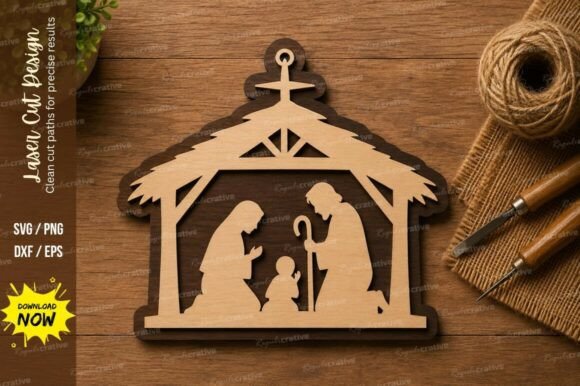
Bringing the Christmas Story to Life with a Nativity Scene Laser Cut SVG Design
There is something undeniably magical about watching a flat piece of material transform into a three-dimensional story right before your eyes. For many crafters and small business owners, the holiday season isn't just about buying decorations; it's about creating them. This is where a Nativity Scene Laser Cut SVG Design becomes an invaluable tool. It serves as the digital blueprint that bridges the gap between a creative idea in your head and a tangible, heartfelt decoration on your shelf. Whether you are a seasoned maker with a workshop full of equipment or someone just dipping their toes into the world of digital fabrication, having access to a premium quality file set can completely change how you approach your holiday projects.
At its core, this design is more than just lines on a screen. It is a carefully prepared vector file intended to guide a laser beam with absolute precision. When you work with a high-quality file, you aren't fighting against jagged edges or disconnected paths. Instead, you are working with clean vectors that ensure every silhouette of Mary, Joseph, the baby in the manger, and the surrounding animals cuts smoothly. The beauty of using a comprehensive package that includes formats like SVG, EPS, PNG, DXF, and PDF is the sheer versatility it offers. You aren't locked into one specific machine or software ecosystem. Whether you are running LightBurn, Silhouette Studio, Adobe Illustrator, or CorelDRAW, these files integrate seamlessly into your workflow.
Real-World Applications for Makers and Businesses
The utility of a Nativity Scene Laser Cut SVG Design extends far beyond a single project type. Consider the home decorator who wants to add a touch of rustic charm to their living room mantle. By feeding a sheet of Baltic birch plywood into a CO2 laser cutter, they can produce a layered shadow box effect. The different layers of wood, perhaps stained in varying shades, create depth and dimension that store-bought plastic figurines simply cannot match. Because the vector design is scalable, you can resize the entire scene to fit a specific nook on a bookshelf or expand it to become a centerpiece for a dining table without losing any crispness in the details.
For small business owners, particularly those selling on platforms like Etsy or at local craft fairs, these designs are gold mines for product diversification. Imagine offering personalized ornaments where the customer's family name is integrated into the base of the nativity stable. With an easy to use file structure, adding text elements becomes a quick task in your design software. You can also experiment with materials beyond wood. Acrylic offers a modern, sleek look, especially when backlit with LED strips. A frosted acrylic nativity scene glowing softly in a window can be a stunning selling point during the dark winter evenings. The compatibility with most laser CNC machines means you can scale production up or down depending on your order volume without needing to reformat your files.
Educators and community leaders also find unique ways to utilize these resources. Picture a church youth group or a school art class working on a collaborative holiday project. Providing students with pre-cut paper or cardstock pieces derived from the PDF or DXF files allows them to focus on assembly and painting rather than struggling with intricate cutting tools. This fosters a sense of accomplishment and community spirit. The clean lines of the design ensure that even younger participants can successfully assemble the pieces, making the activity inclusive and enjoyable for all ages.
Material Choices and Creative Possibilities
One of the most exciting aspects of working with a Nativity Scene Laser Cut SVG Design is the freedom to choose your medium. While wood is the traditional choice, lending a warm, organic feel to the religious imagery, other materials open up entirely new aesthetic avenues. Metal enthusiasts can use fiber lasers to etch or cut thin sheets of aluminum or brass, creating heirloom-quality pieces that will last for generations. The precision required for metalwork demands a file with perfect vector paths, which is exactly what a premium design set provides.
Paper crafters, too, benefit immensely from these digital assets. Intricate paper cutting, often done by hand with scalpels, can be time-consuming and prone to error. By using a laser cutter with a low-power setting, you can achieve incredibly delicate cuts in heavy cardstock or watercolor paper. This is perfect for creating holiday cards that stand out. Imagine sending a greeting card that unfolds to reveal a miniature, laser-cut nativity scene. The PNG format included in the package can also be used for sublimation printing or as a reference for hand-painting, giving artists a perfect outline to follow.
It is important to consider the limitations and requirements of your specific setup before diving in. While the design is ready for laser cutting and engraving, the thickness of your material will dictate how many passes your laser needs to make. Thicker woods may require multiple passes, which can sometimes lead to slight charring on the edges. Testing on scrap material is always a wise move. Additionally, if you plan to create a 3D assembled scene, pay attention to the slot widths in the design. Premium files usually account for standard material thicknesses, but if you are using non-standard materials, you may need to adjust the kerf offset in your software to ensure a snug fit.
Why File Quality Matters for Your Projects
In the world of digital crafting, not all files are created equal. A poorly constructed SVG can have open paths, overlapping lines, or non-vector elements that cause the laser to behave erratically, resulting in ruined material and wasted time. This is why investing in a premium quality laser cutting design file set is crucial. A professionally prepared file ensures that every line is closed, every node is optimized, and the layers are logically organized. This attention to detail translates directly to the physical output. Smooth cuts mean less sanding and finishing work for you, allowing you to move from the machine to the final product much faster.
The inclusion of multiple formats like EPS and DXF caters to professional workflows where specific file types are required for industrial machines or specialized plotting software. Meanwhile, the SVG format remains the universal standard for hobbyist machines like Glowforge or xTool. Having all these options in one instant download package eliminates the frustration of searching for compatible files or paying extra for conversions. It empowers you to start creating immediately, regardless of the tool you have at hand.
Ultimately, the goal of using a Nativity Scene Laser Cut SVG Design is to capture the spirit of the season through creation. It allows you to put a personal stamp on a timeless story. Whether you are making a gift for a loved one, stocking your holiday shop inventory, or simply enjoying the process of making something beautiful, the right digital foundation makes all the difference. The ability to resize without losing quality means your creativity is the only limit. You can create a tiny ornament for a tree or a large wall hanging for a sanctuary. The flexibility, combined with the precision of laser technology, turns a simple digital file into a cherished physical memory.
As you plan your next project, remember that the success of your cut lies in the quality of your source file. Choosing a robust, multi-format set designed specifically for laser applications ensures that your focus remains on the joy of making rather than troubleshooting technical issues. From the first click of the download button to the final assembly of the holy family, the experience should be smooth, inspiring, and rewarding. Embrace the possibilities that modern technology offers to traditional crafts, and let your laser cutter bring the nativity story to life in ways you never imagined.