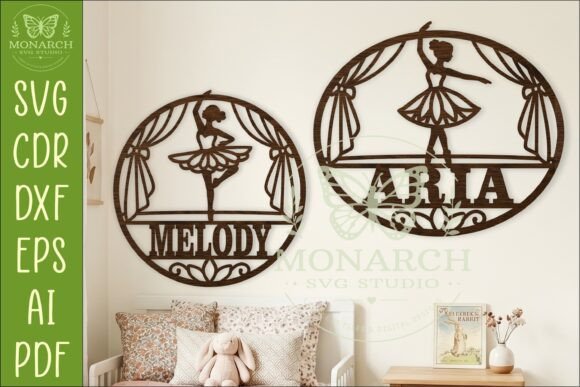
Integrating the Ballerina Name Sign SVG Personalized into Your Custom Decor Workflow
In the realm of custom home decor and small-batch manufacturing, efficiency and precision are paramount. Whether you are a professional sign maker running a laser cutting business, a hobbyist creating gifts for family, or an interior designer sourcing unique assets for a client's nursery, the foundation of a successful project lies in the quality of your digital files. The Ballerina Name Sign SVG Personalized represents more than just a cute design; it is a functional asset designed to streamline the production process from concept to final installation. By understanding how this specific file type fits into a broader creative workflow, creators can minimize errors, reduce material waste, and deliver high-quality finished products consistently.
This digital asset features a graceful ballet dancer on stage framed by flowing curtains, optimized specifically for single-layer cutting methods. Unlike complex multi-layer illustrations that require intricate assembly and gluing, this design is engineered for speed and structural integrity. When integrated into your project pipeline, it serves as a versatile template that adapts to various scales, typically ranging from 20cm to 50cm, with a recommended standard width of 25cm (10 inches) or an oval variant at 28cm (11 inches). Understanding the technical specifications and preparation steps required for this file ensures that whether you are using a CO2 laser, a diode cutter, or a metal plasma system, the execution phase proceeds without interruption.
Pre-Production Planning and File Compatibility
Before any physical cutting begins, the integration of the Ballerina Name Sign SVG Personalized starts with file management and software preparation. Upon purchasing this digital download, you receive a ZIP folder containing multiple file formats, including SVG, DXF, AI, CDR, and PDF. This variety is crucial for workflow compatibility. If your primary design software is Adobe Illustrator, the AI file offers native layer control. For CorelDRAW users, the CDR format ensures seamless import. Meanwhile, the DXF and SVG formats provide universal compatibility for browser-based tools like Canva or specialized laser software such as LightBurn and XCS.
A critical step in the planning phase is verifying the cut lines. The files are formatted with exterior cut lines in blue, a standard convention in the industry that distinguishes between vector paths intended for cutting and those meant for engraving or scoring. This visual cue reduces the risk of accidental over-cutting or misalignment during the setup. For those new to personalization, the included PDF with step-by-step instructions and links to tutorial videos acts as a vital resource. These guides bridge the gap between acquiring the file and executing the customization, specifically demonstrating how to link a name to the dancer figure effectively. Taking the time to review these resources before opening your cutting software prevents common pitfalls, such as incorrect node welding or font compatibility issues.
Customization and Design Execution
The core value of this asset lies in its adaptability. Once the file is imported into your workspace, the process of personalization begins. This is where the workflow shifts from preparation to active creation. The design is structured to allow the insertion of a name, typically weaving through the dancer's pose or resting along the stage floor. When selecting a font, it is essential to choose a typeface that balances aesthetic appeal with structural durability. Thin, script fonts may look elegant on screen but can result in fragile connections in wood or acrylic if the bridges are too narrow. A practical approach involves testing the name placement at the intended scale—whether 20cm for a small shelf decor or 50cm for a statement wall piece—to ensure all connecting points remain robust.
During this phase, consistency is key. If you are producing these signs for a batch of orders, perhaps for a dance studio recital or a series of nursery commissions, establish a standard operating procedure for text manipulation. Save your preferred font settings and spacing rules as a template within your software. This reduces the decision-making load for each subsequent project and ensures that every Ballerina Name Sign SVG Personalized you produce maintains a uniform level of quality. Additionally, consider the material constraints early in the design stage. If you are cutting reflective acrylic, the contrast between the material and the cut lines might differ from Baltic birch plywood, requiring slight adjustments in your preview settings to verify visibility.
Material Selection and Machine Setup
Transitioning from digital design to physical production requires careful consideration of materials and machine parameters. The single-layer nature of this design makes it highly efficient for material usage, allowing you to nest multiple signs on a single sheet of stock to maximize yield. Common materials for this application include 3mm to 6mm plywood, MDF, and cast acrylic. Each material interacts differently with laser cutters and CNC machines, necessitating specific power and speed settings.
For laser cutting, the "blue line" exterior cut feature simplifies the setup. You can assign a specific color in your laser software to these paths, automatically applying the correct power and speed profile designated for cutting through the material thickness. If you are using a metal cutter or plasma table, the DXF file provides the clean vector paths needed for precise torch movement. It is advisable to run a test cut on a scrap piece of the same material before committing to the final piece. This quality control step verifies that the name connections hold up under the cutting process and that the delicate details of the ballet dancer's tutu and curtains do not burn away or break off.
Organization plays a significant role here as well. Keep your digital assets organized by project date or client name within your hard drive structure. Since this is a digital download with no physical item mailed, the responsibility for file security rests entirely on the user. Maintain backups of the original ZIP folder and your edited working files. This practice protects against data loss and allows for easy re-orders or modifications if a client requests a size change or a different name spelling in the future.
Post-Processing and Final Assembly
Once the cutting process is complete, the workflow moves to post-processing. Single-layer designs often require minimal assembly, which is a significant advantage for turnaround time. However, attention to detail during finishing elevates the product from a DIY craft to a professional-grade item. Remove any slag or burn marks from the edges using fine-grit sandpaper or a scraping tool. For wooden signs, applying a sealant, stain, or paint not only enhances the visual appeal but also protects the material from humidity and wear, extending the lifespan of the decor.
If the design includes hanging mechanisms or mounting holes, ensure these are cleared of debris. The recommended sizes, such as the 25cm wide version, are optimized for standard nursery walls or bedroom doors, but the scalability of the SVG means you can easily adjust for larger commercial spaces like dance studio lobbies. When delivering the final product, whether to a client or installing it in your own home, consider the presentation. Packaging the sign with protective backing prevents scratches during transit. For entrepreneurs, including a small care card with the package adds a professional touch and reinforces the value of the handmade design.
Ultimately, the Ballerina Name Sign SVG Personalized is a tool that supports a streamlined, professional workflow. By respecting the technical nuances of the file formats, adhering to a structured customization process, and maintaining rigorous quality control during cutting and finishing, creators can reliably produce beautiful, personalized decor. This approach not only satisfies the immediate goal of creating a charming ballet-themed room accent but also builds a foundation for scalable, efficient production in the custom decor market.